---
title: 'New Favorite Website!'
date: 2023-09-27T10:07:01-04:00
tags: ["resources", "shell", "commandline"]
author: "Me"
showToc: false
TocOpen: false
draft: true
hidemeta: false
description: 'Regex101 has long been one of my favorite reference tools. As of today, I will be adding ExplainShell to the list of must-use tools!.'
disableHLJS: true # to disable highlightjs
disableShare: false
disableHLJS: false
hideSummary: false
searchHidden: true
ShowReadingTime: true
ShowBreadCrumbs: true
ShowPostNavLinks: true
ShowWordCount: true
ShowRssButtonInSectionTermList: true
UseHugoToc: true
cover:
image: "new-website-cover.png"
alt: "Add explainshell.com to your list of favorite websites! Right behind regex101.com."
caption: "ExplainShell and Regex101 are the most needed tools in your arsenal."
relative: false # when using page bundles set this to true
hidden: true # only hide on current single page
---
For the longest time, I had [Regex101](www.regex101.com) as a bookmarked website for (almost) daily use. Not only does it
help me build muscle memory for using regex queries without banging my head against the wall with a bunch of print and debug
statements, but if I happen to be in a different language - say in javascript instead of python - it gives you the correct
syntax for using regex in that language. There are even [spin-off projects](https://github.com/nedrysoft/regex101) to use
this tool while offline.
You can even test it again the strings you do (or don't!) want to verify against. This website is beyond cool.
So this morning, when I saw [Jérémy Garniaux](https://mapstodon.space/@jeremy) ask if there was an "explain shell" for Vim or
Neovim, this was the Regex101 but for shell commands.
{{< box info >}}
_Side Note: it took me way too long how to figure out how to embed an iframe directly into Hugo without creating a new shortcode template and other suggestions. I'll be sure to post about that in the future._
{{< /box >}}
When you first load ExplainShell.com, you're greeted with a clean, minimal interface with some explanation and a very obvious
search bar.

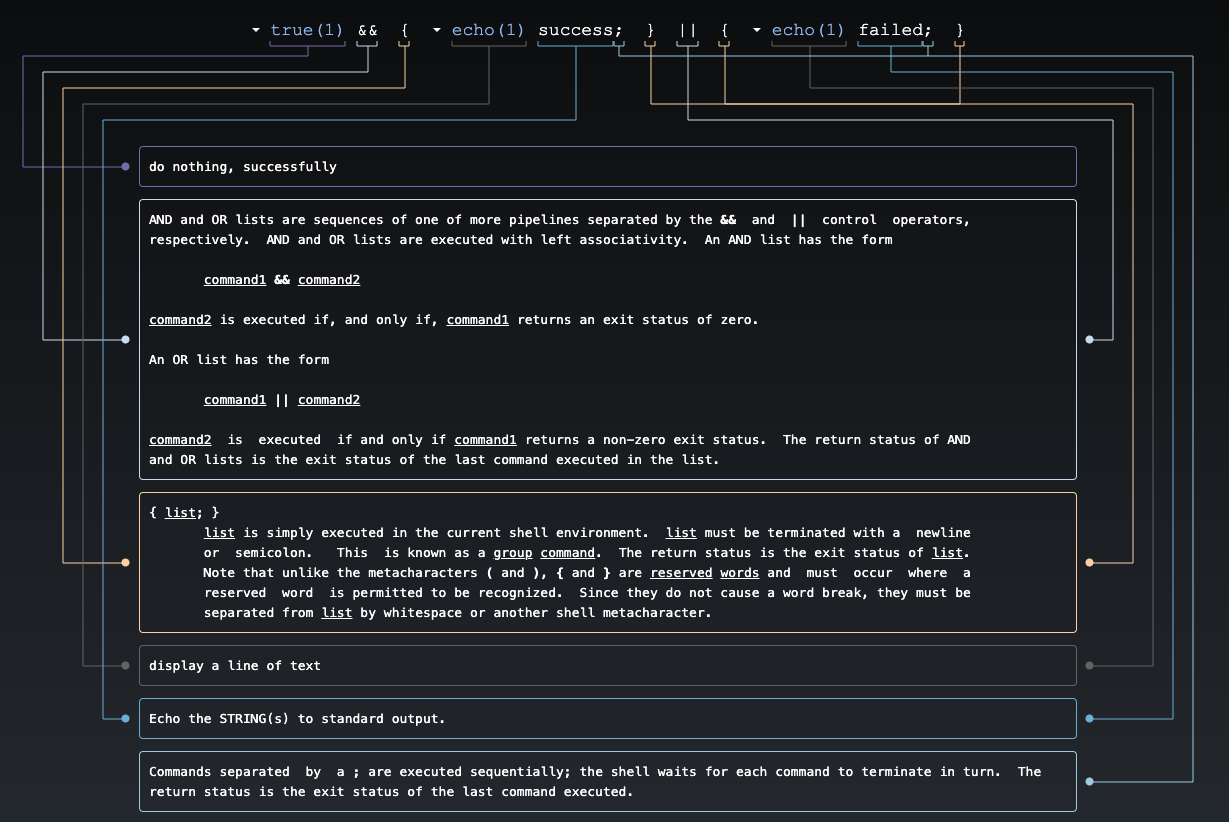
For those new to the command line, it also shares some suggested queries to search with. As you read over the results, you
can hover on the different elements of the command and it will highlight the explanation below. I mean, look at how clean and
nice that is!
As many other command line users are apt to do, I use the man page all the time for commands and flags I'm unsure of, or need
a refresher on. While knowing what a certain flag is and what it does for a specific command is supremely helpful, I find the
man pages a tad bit overwhelming. You can always `grep` for what you're looking for, but even then I've found times where it
only pulls out half of the full description, or even just the line the definition is on.
So the fact that this resources can extract exactly what you need in your command from a man page without digging through
every line, is extremely useful! Going back to Jérémy's original toot and question... who is going to make this same tool for
Neovim?