What is a Shopping offer?
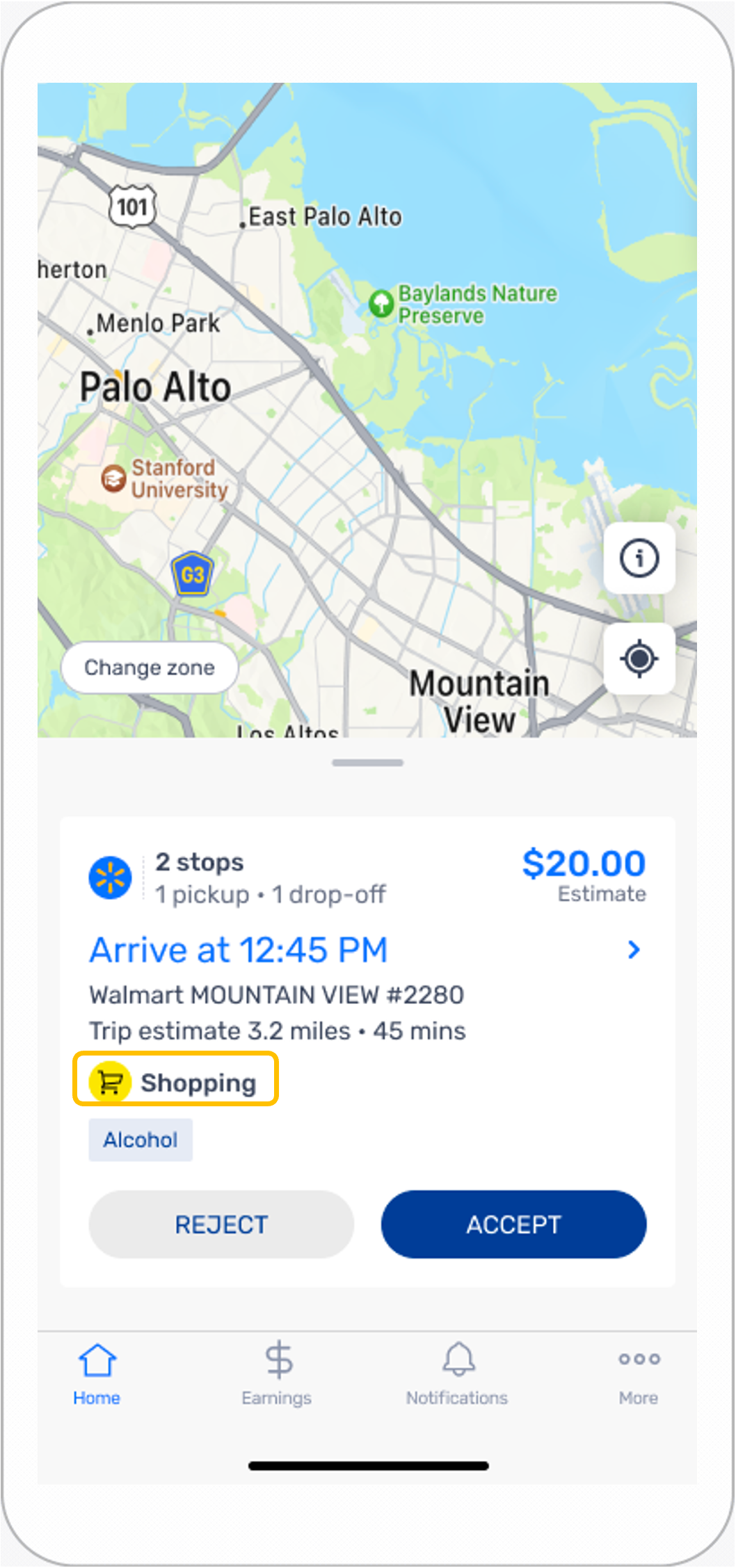
Shopping offers give you the opportunity to shop and deliver the order to one or more customers all in the same trip
How can I tell if an offer is for a Shopping order?
These orders will be labeled Shopping on the offer card.
Additional details on the offer card may include: the size of the order(s), number of drop-offs, distance to the customer(s) location(s), approximate shopping and delivery time, and the estimated earnings.
Do I have to accept Shopping offers?
No. What offers you accept are always up to you.
Will Shopping offers contain alcohol?
Possibly. Alcohol delivery is available in many stores. Whether you choose to deliver orders containing alcohol is up to you.
Shopping orders containing alcohol may include additional verification steps during the checkout and delivery process. To deliver orders containing alcohol, you must be at least 21 years old. The store associate may ask you for identification to confirm your age. State laws require customers receiving orders with alcohol to be at least 21 years old. Customers must show a valid, unexpired government-issued photo ID upon delivery. You can view more information on delivering an order with alcohol here.
Are Shopping orders time or temperature-sensitive?
Yes, groceries are often temperature sensitive. If perishable items are kept at room temperature for too long, the order will be automatically canceled to preserve food safety. If you want more information about perishable items, see Canceled order due to food safety.
The app provides a recommended Deliver By time based on the estimated amount of time to shop and deliver the order to the customer.
Is there a designated place I should go in the store if I need help?
Store associates at the main customer service counter are available to assist with any shopping-related questions you have.
Earnings
Are incentives offered for Shopping orders?
Incentives are sometimes offered for Shopping orders. You can find them under Incentive Programs in the app.
Shopping
Will I have access to the store Wi-Fi to ensure reception during shopping?
Yes. All individuals who enter a Walmart store can connect to the open-access WiFi network available in the store.
What if the barcode won't scan?
If the scanning function isn’t available, the app displays a help (?) icon in the top-right. You can tap the help (?) icon and select Barcode won't scan to enter the UPC and quantity details.
What if a customer selected an item with a yellow label showing a discount price?
Sometimes, when you are shopping there may be only one item left on the shelf with a large yellow discount label. These are Customer Value Program (CVP) items and cannot be selected for shopper orders.
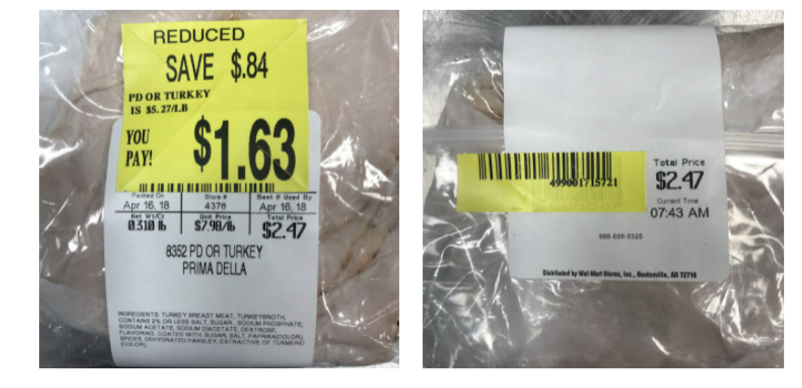
When shopping, it is important to ensure the customer’s requested item does not display a CVP label. If the requested item does display a CVP label, you can complete the item request by pressing the CAN’T FIND ITEM button to select a substitution.
What happens if I can’t find an item?
If you can’t find an item, you can try a few options:
- Ask an associate if the item is available in the store in another location.
- Pick a substitution from the suggested recommendations.
- If no substitutions are recommended or none of the recommended substitutions are available, you can use your judgement to scan a suitable replacement of similar type, price, size, and quantity by selecting SCAN BARCODE. If you feel that there is not a suitable substitution, you can swipe NO SUBSTITUTION FOUND to indicate that the item is out of stock and continue shopping.
Will the customer be notified if an item on their list is out of stock?
Yes, customers receive an email and/or SMS if items are out of stock and/or substitutions were made.
Can I communicate with the customer while I'm shopping?
Yes, you can chat with the customer during Shopping orders after you’ve picked the first item. You can use this feature to message and send photos to customers to clarify any item requests or discuss substitutions.
For more information, see Communicating with customers.
What if the customer asks me to add items to their order?
After an order has been placed, new items can’t be added by the shopper at this time.
What happens if I close out of the shopping list before I'm finished?
If you close the shopping list before you’re finished, you may reopen the list and pick up where you left off. If you’re experiencing app issues, you can restart your device without losing your trip progress.
Checking Out
Do I need to pay for a customer’s order?
Orders are prepaid by customers. For more on checking out orders, see Checking out Shopping & Delivery orders.
Will I get a receipt to give to the customer?
No, after placing their order online, customers receive electronic receipts in their email.
Will the customer be notified when shopping is complete?
Yes, customers will be notified by email and/or text message when shopping is complete.
Can I shop for personal items while I’m shopping for the customer’s order?
Yes. Feel free to shop for yourself while shopping for the customer’s order. However, any personal items should be kept separate from the customer’s items to avoid errors at checkout.
Tip: Using an empty basket to carry your own items or placing them in a clearly divided section of the shopping cart can help keep orders separated, for example, the bottom rack or in the child’s seat.
Bagging
Can I bring my own reusable bags for shopping orders?
Unless the customer opts out of bags, you should only use store-provided bags when delivering to the customer. If store-provided bags are unavailable, you can ask an associate.
Do customers expect their items to be in bags if their orders only have one or two items?
Customers usually expect their items in bags, even if there are only one or two items. Sometimes customers choose not to receive their items in bags. When they do, you will see the No-Bag Checkout screen.
For counties or states that require bagless delivery, you can pick up reusable bags near the customer-service counter before you start shopping.
Bagging items like produce and meat separately helps you maintain food safety standards and prevents cross contamination.
Review the Shopping & Delivery video for more details!
Loading
What if I finish shopping but can't fit the entire order into my car?
If you cannot fit the entire order in your car, you can cancel the order in app or reach out to Driver Support. Once the order is canceled, feel free to leave the cart at the customer service desk. Associates can return the items to shelves from there.
To avoid this in the future, see Vehicle details where you can add your vehicle size to your profile.